090 lesson: slide it sideways
Drive a mecanum robot: the left stick drives and slides, the right stick turns, and all three can happen at once. Each wheel gets its own power.
the steps
L090S010: copy the starter into mytry
Copy. In lessons, click L090MecanumOpMode once and copy it. Click mytry once and paste.
In the Copy Class box, click OK. If Android Studio asks whether to add the file to Git,
click Add.
Check.
mytryholdsL090MecanumOpMode, and the new file is open.
L090S020: switch your copy on
Change. Delete the line @Disabled, under the comment that names this step.
Check.
Under the step’s comment, the next line reads
// 'public' so the robot can run this OpMode. 'public' allows access from any code.
L090S030: read the slide
A mecanum wheel has small rollers around it, set at 45 degrees. Spinning the wheel pushes the robot along and sideways at the same time. With four of them, the robot can drive, slide and turn.
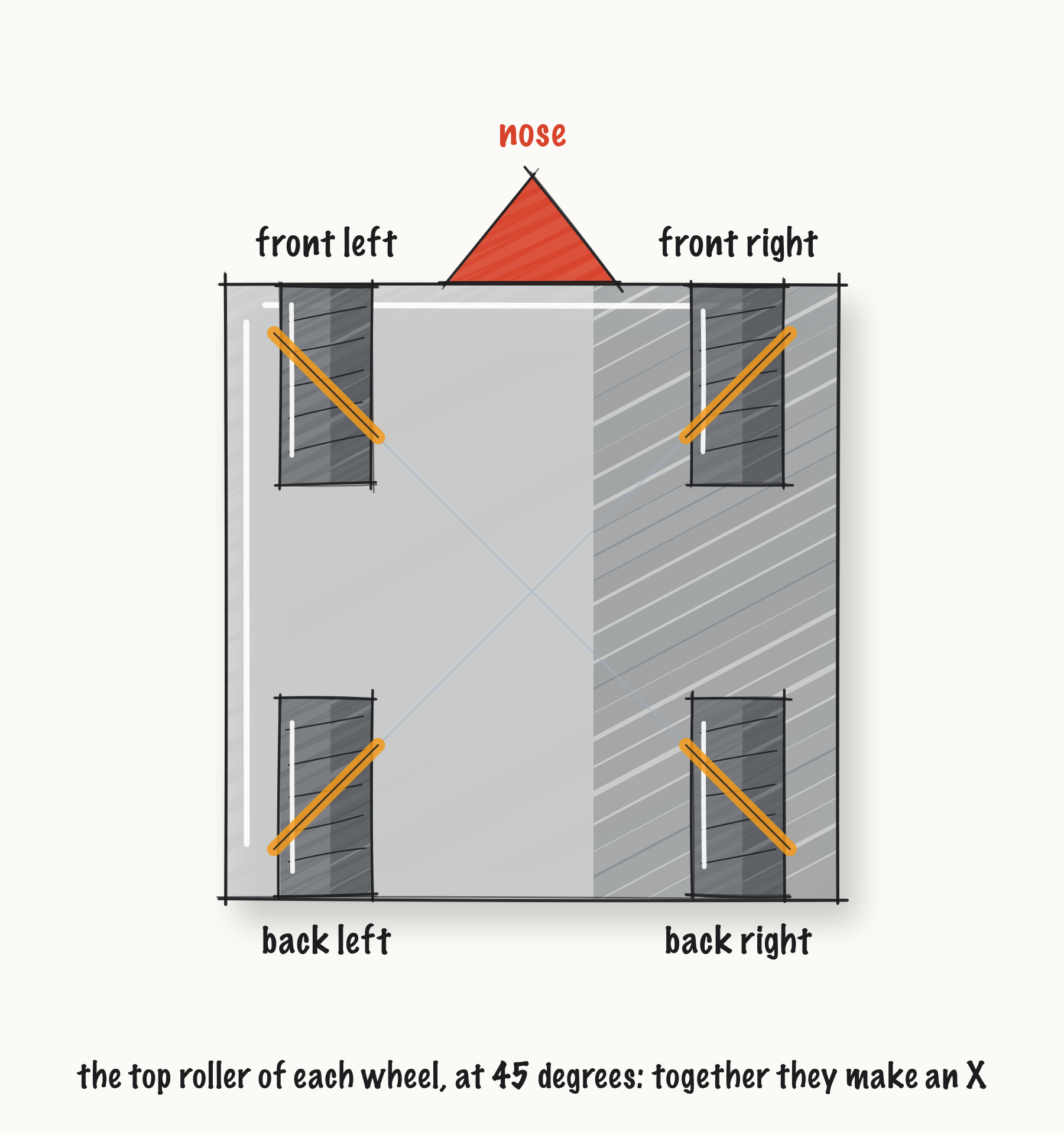
Seen from above, the top rollers make an X. Game Manual 0 shows it on this page. A mecanum wheel is a left wheel or a right wheel, and the two are mirror images. goBILDA’s page shows both: https://www.gobilda.com/96mm-mecanum-wheel-set-70a-durometer-bearing-supported-rollers/
The starter has forward and turn from L080. The slide is the third number, and it comes from the
left stick, sideways.
Change. In driveFromTheSticks(), find the comment that names this step. Under it, type:
        // When on L090S030, see
        // https://msb-stitt.github.io/ftc31459-26-27-biobuzz/guide/tasks/l090.html#l090s030
        // for what to do here.
        double strafe = deadband(-leftStickX, band);
        strafe = signedSquared(strafe);
        Tracker.publish("arcade/strafe", strafe);
Strafe is the robot word for sliding sideways. The stick reads above 0.0 to the right, and the minus sign makes a slide to the left positive, the same way a turn to the left is.
Check.
Neither line has a red underline.
L090S040: give each wheel its power
Each wheel adds up the three numbers its own way:
Wheel |
forward |
strafe |
turn |
|---|---|---|---|
front left |
+ |
- |
- |
front right |
+ |
+ |
+ |
back left |
+ |
+ |
- |
back right |
+ |
- |
+ |
Change. Find the comment that names this step. Under it, type:
        // When on L090S040, see
        // https://msb-stitt.github.io/ftc31459-26-27-biobuzz/guide/tasks/l090.html#l090s040
        // for what to do here.
        double frontLeftPower = forward - strafe - turn;
        double frontRightPower = forward + strafe + turn;
        double backLeftPower = forward + strafe - turn;
        double backRightPower = forward - strafe + turn;
        Tracker.publish("power/frontLeft", frontLeftPower);
        Tracker.publish("power/frontRight", frontRightPower);
        Tracker.publish("power/backLeft", backLeftPower);
        Tracker.publish("power/backRight", backRightPower);

        hardware.frontLeft.setPower(frontLeftPower);
        hardware.frontRight.setPower(frontRightPower);
        hardware.backLeft.setPower(backLeftPower);
        hardware.backRight.setPower(backRightPower);
Simulator. In the Terminal, run:
./gradlew :TeamCode:simRun --args="mytry.L090MecanumOpMode --pad"
AdvantageScope. Connect to the simulator as in L020, and click 2D Field. Open the arcade
and power folders.
Check.
Push the left stick halfway left.
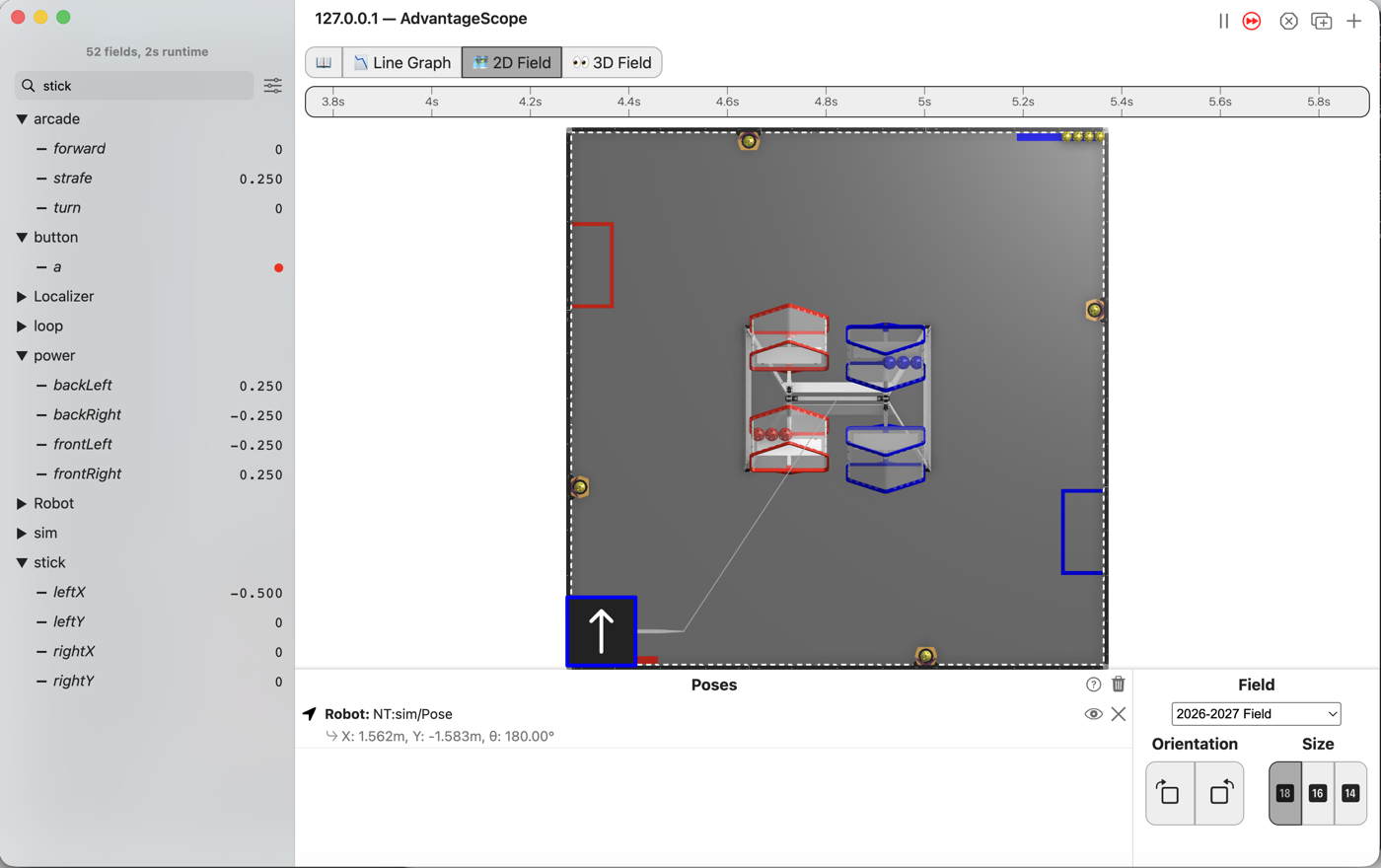
strafereads 0.25.The front right and back left wheels read 0.25, and the other two read -0.25.
The robot slides to its own left, and its nose keeps pointing the same way!
Forward and turning work as they did in L080.
L090S050: scale all four
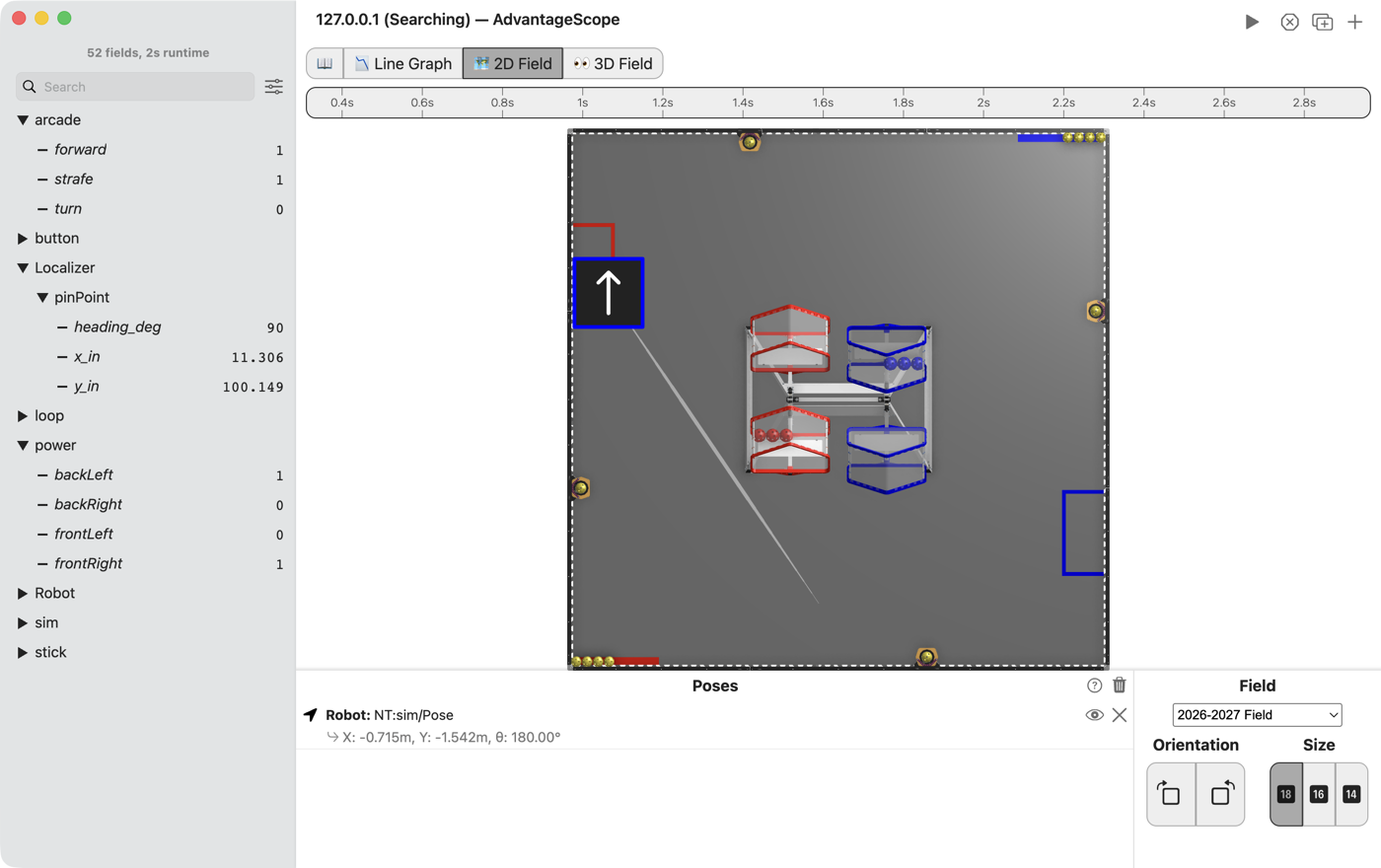
Push the left stick into a corner, all the way forward and all the way left. forward and strafe
are both 1.0, so the front right and back left wheels ask for 2.0. That is twice what a motor has.
Change. Press Ctrl+C in the Terminal to stop the simulator. Go back to the four lines that make the wheel powers. Under them, type:
        double frontLeftPower = forward - strafe - turn;
        double frontRightPower = forward + strafe + turn;
        double backLeftPower = forward + strafe - turn;
        double backRightPower = forward - strafe + turn;
        double frontLeftSize = Math.abs(frontLeftPower);
        double frontRightSize = Math.abs(frontRightPower);
        double backLeftSize = Math.abs(backLeftPower);
        double backRightSize = Math.abs(backRightPower);
        double biggest = Math.max(frontLeftSize, frontRightSize);
        biggest = Math.max(biggest, backLeftSize);
        biggest = Math.max(biggest, backRightSize);
        biggest = Math.max(1.0, biggest);
        frontLeftPower = frontLeftPower / biggest;
        frontRightPower = frontRightPower / biggest;
        backLeftPower = backLeftPower / biggest;
        backRightPower = backRightPower / biggest;
This is L080’s scaling, for four wheels. Math.max takes two numbers, so finding the biggest of
four sizes takes three calls: the first compares the two front wheels, and each of the next two
brings in one more wheel. The last Math.max keeps biggest from going below 1.0, as in L080.
Simulator. Run the same command again, and connect AdvantageScope.
Check.
Push the left stick into the forward-left corner. The front right and back left wheels read 1.0, and the other two read 0.0.
The robot drives diagonally, forward and to its left, with its nose still pointing forward.
L090S060: check every wheel on blocks
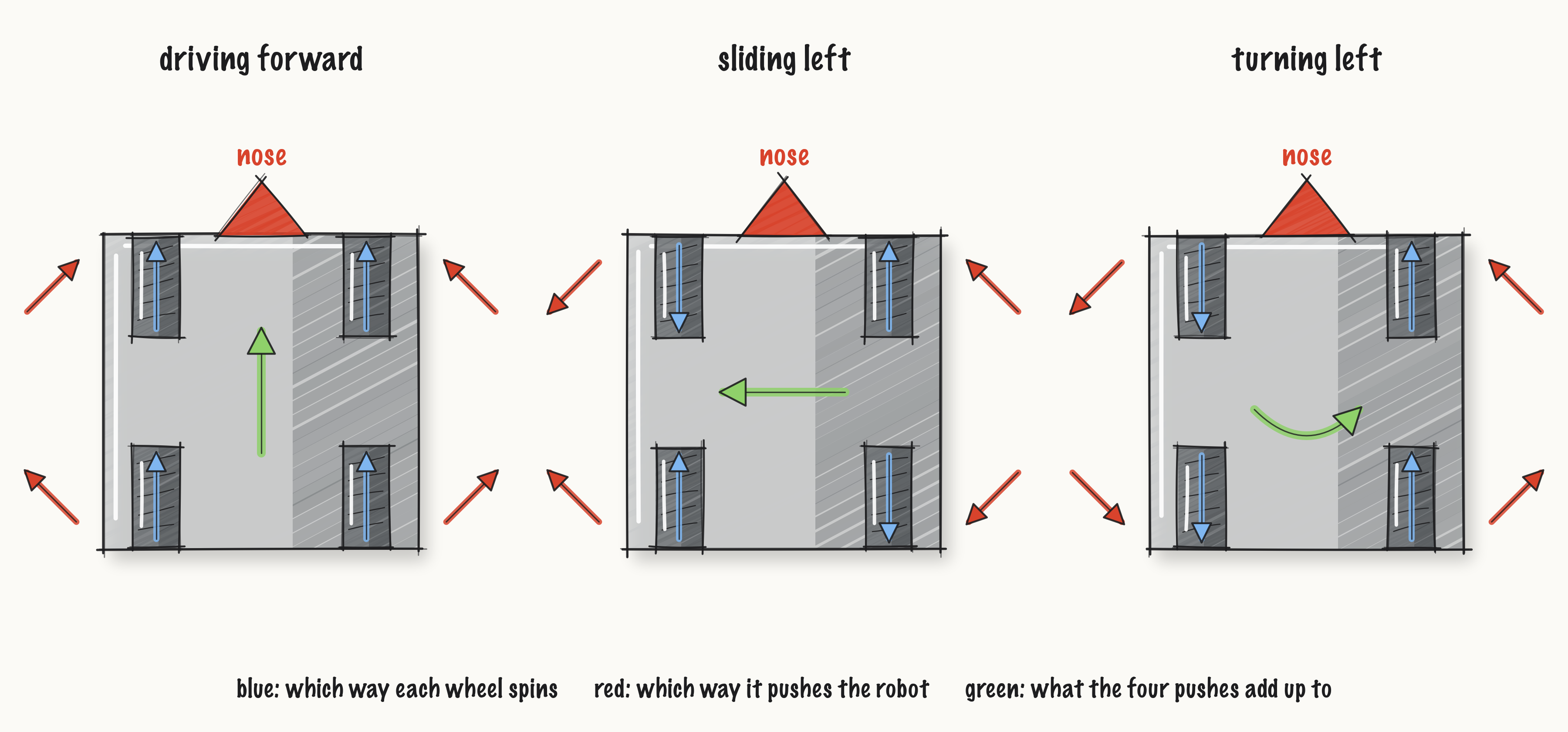
A mecanum wheel spinning forward pushes the robot forward and sideways at once. The front left and back right wheels push forward and to the right. The front right and back left wheels push forward and to the left. Spinning backward, each pushes the opposite way. The robot moves the way the four pushes add up.
Robot. Stop the simulator. Rest the robot on the blocks, so all four wheels are off the ground.
Send the code, and run L090 Mecanum from the Driver Station.
Check.
Push each way gently and watch the top of each tire:
Push |
front left |
front right |
back left |
back right |
|---|---|---|---|---|
left stick forward |
forward |
forward |
forward |
forward |
left stick left |
backward |
forward |
forward |
backward |
right stick left |
backward |
forward |
backward |
forward |
Left stick forward: all four push forward, and their sideways pushes cancel. Left stick left: the forward and backward pushes cancel, and all four push left. Right stick left: the left side pushes backward and the right side forward, so the robot turns left.
Write down any wheel that turns the other way. A wheel that turns backward for every push needs its direction swapped, as in L050S070. A wheel that is right for forward but backward for a slide is on the other corner. Check the X from above.
L090S070: drive it on the floor
Drive. Press STOP. Lift the robot off the blocks and put it on the floor. Press INIT, then PLAY.
Check.
Push the left stick left, and the robot slides to its own left with its nose still pointing the same way.
Push it into a corner, and the robot drives diagonally.
Push the right stick while sliding, and it turns as it slides.