115 lesson: mount the Pinpoint and plug it in
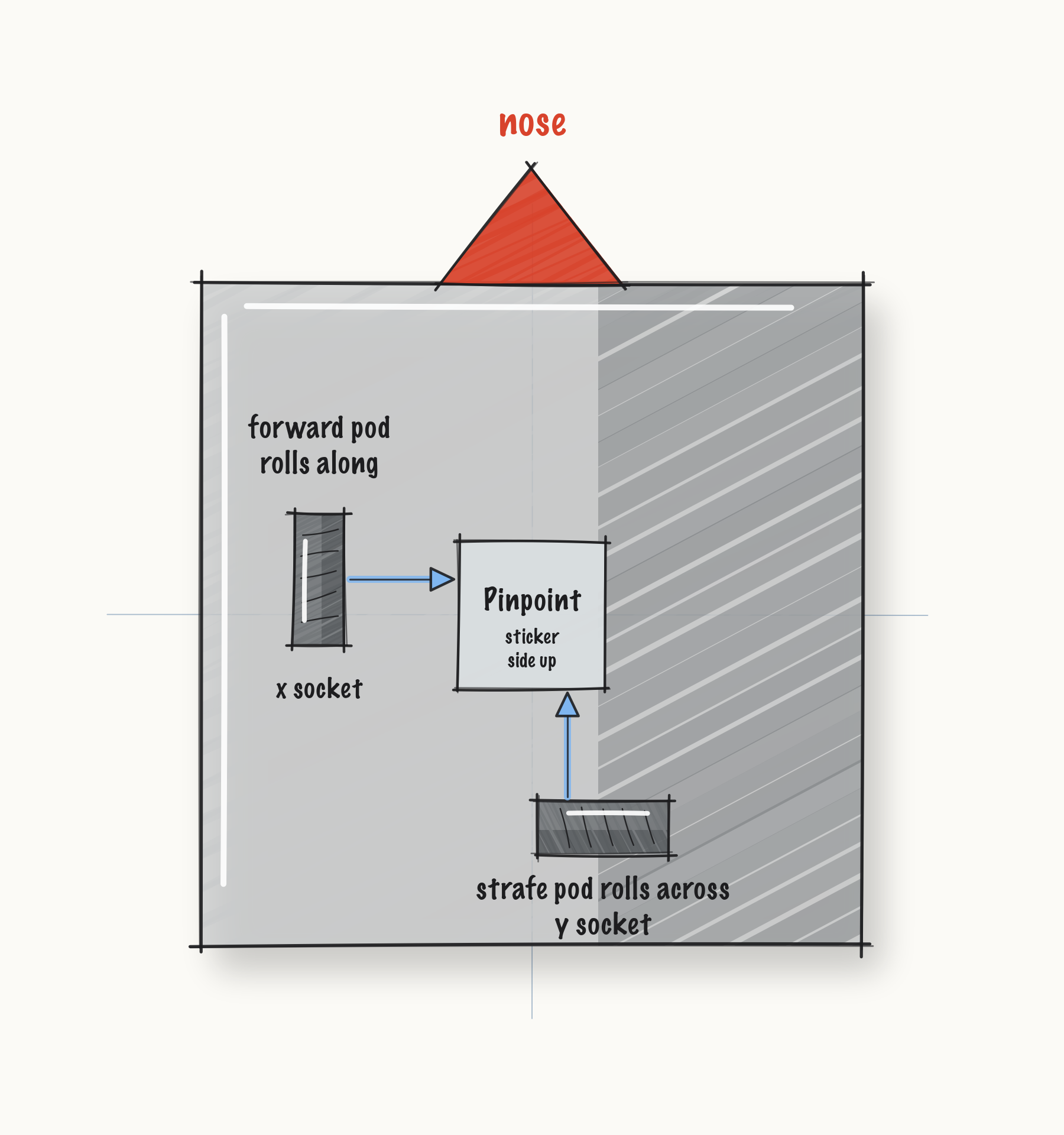
The Pinpoint is bolted on, its two pods are in the right sockets, and the Control Hub finds it when you press INIT. The robot does not yet know how far the pods sit from its middle. L117 measures that.
Before you start.
L110 is done, so the follower holds the drivetrain. The follower is what builds the Pinpoint.
The robot, the two odometry pods, and whatever driver the robot’s own screws take.
The I2C cable the Pinpoint came with, and the Driver Station.
The three rules in L115S010 and L115S020 are Pedro’s, from its Pinpoint page.
the steps
L115S010: put one pod along the robot and one across it
The Pinpoint counts two wheels that nothing drives. One rolls along the length of the robot, and that one is the forward pod. The other rolls across it, and that one is the strafe pod.
Both have to touch the floor the whole time, and neither may be able to lift. A pod that skips loses count, and nothing after it can tell that it did.
Mount. Bolt the two pods on, one along the robot and one across it. Plug the forward pod into the Pinpoint’s x socket and the strafe pod into its y socket.
Check.
Push the robot forward by hand. The forward pod’s wheel turns.
The strafe pod’s wheel drags sideways.
L115S020: plug it into an I2C port that is not port 0
The Pinpoint talks to the Control Hub over I2C. Port 0 already has the Control Hub’s own IMU on it, so the Pinpoint goes on another port.
Mount. Bolt the Pinpoint on with its sticker side, the side the ports are on, facing up. Plug its cable into I2C port 1, 2 or 3 on the Control Hub.
Configure. On the Driver Station, open the robot’s configuration. Add the Pinpoint on that
port, and name it pinpoint, spelled exactly that way. That is the name the code asks for:
c.name.set("pinpoint");
Check.
Pick
L110 Followerfrom theLessonsgroup and press INIT.INIT finishes with no error.
INIT looks for the Pinpoint by its name, so if INIT finishes, it was found.
L115S030: hold the robot still while it inits
Pressing INIT builds the follower, and the follower builds the Pinpoint. The Pinpoint then resets its own gyro, which takes about a quarter of a second. The robot has to sit still for it.
Robot. Put the robot on the floor, step back, safety glasses on! Pick L110 Follower on the
Driver Station and press INIT, but not PLAY yet. Watch it in AdvantageScope.
Check.
Before you press PLAY,
Localizer/pinPoint/heading_degholds steady while the robot sits still.
Drive. Press PLAY and drive a slow square.
Check.
The heading comes back to where it started.
If it didn’t, and a pod wheel does not turn at all in L115S010, it is not reaching the floor. Most mounts have a slot for that.
If it didn’t, and the Driver Station shows this at INIT, the name in the configuration is not the name in the code:
Unable to find a hardware device with name "pinpoint" and type GoBildaPinpointDriver
A still robot cannot show whether the numbers are live; the square shows that.
If it didn’t, and the heading crawls one way while the robot sits still, INIT happened while the robot was moving. Press STOP and INIT again without touching it.
If it didn’t, and forward and sideways come out swapped once L117 has tuned the pods, the two pods are in each other’s sockets. L115S010 is where that gets fixed, and no amount of tuning works around it.
Where the rest comes from. The missing-device message is the one HardwareMap.get throws in
the SDK. The reset at INIT is PinpointConfig’s default resetMode, which PinpointLocalizer’s
constructor acts on. The still robot and the quarter second are from the goBILDA driver’s own
javadoc.
What you just did. Every lesson from L120 on believes the Pinpoint. L120 puts a second way of tracking the robot beside it and shows the drive encoders drifting away from it over a run. L195 measures the robot against it. A pod in the wrong socket makes all of that quietly wrong instead of loudly broken.
The Pinpoint needs nothing from the drive motors to know where the robot is. Its two wheels are not driven, so a mecanum roller cannot scrub them sideways and a slipping wheel cannot spin them.
Where next. L117 lets AutoTune tune the robot.