195 lesson: measure the two numbers L190 trusted
Two numbers in Constants.java that came off this robot instead of somebody else’s: how many
encoder ticks make an inch, and how far a wheel sits from the middle. The robot measures them
while you push it and spin it by hand.
Before you start.
L190 is done. It is the lesson that uses both numbers.
The Pinpoint is mounted, as in L115, and its offsets set, as in L117, because this measurement believes it.
AdvantageScope is installed on the same laptop.
The robot, the Driver Station, about 1.5 m of clear straight floor for the push, and room to spin the robot on the spot.
the steps
L195S010: copy the three starters into mytry
This lesson has three files. Two are OpModes, one for each measurement. The third is the drivetrain, which tells them what each wheel’s encoder has counted.
Copy. In lessons, click L195MeasureTicksPerInchOpMode once. Hold Shift and click
L195TicksDriveTrain, so all three are picked. Copy them, click mytry once, and paste. In the
Copy box, click OK. If Android Studio asks whether to add the files to Git, click Add.
Copy all three at once. Copied one at a time, the OpModes still point at the drivetrain in
lessons, and turn red.
Check.
mytryholdsL195MeasureTicksPerInchOpMode,L195MeasureTurnRadiusOpModeandL195TicksDriveTrain, and none of them shows red.
L195S020: switch both OpModes on
Change. In L195MeasureTicksPerInchOpMode, delete the line @Disabled, under the comment that
names this step. Do the same in L195MeasureTurnRadiusOpMode.
Check.
In both, under the step’s comment, the next line reads
// 'public' so the robot can run this OpMode. 'public' allows access from any code.
L195S030: open a door to the encoders
Open L195TicksDriveTrain. A drivetrain sends four powers out to the motors. wheelTicks() is
the same shape pointing the other way: it brings four numbers back.
Change. In wheelTicks(), find the comment that names this step. Under it, type:
        // When on L195S030, see
        // https://msb-stitt.github.io/ftc31459-26-27-biobuzz/guide/tasks/l195.html#l195s030
        // for what to do here.
        ticks[FL] = hardware.frontLeft.getCurrentPosition();
        ticks[FR] = hardware.frontRight.getCurrentPosition();
        ticks[BL] = hardware.backLeft.getCurrentPosition();
        ticks[BR] = hardware.backRight.getCurrentPosition();
getCurrentPosition() is how many ticks a motor’s encoder has counted since the robot started.
FL, FR, BL and BR name the slots, as in L190.
Simulator. In the Terminal, run:
./gradlew :TeamCode:simRun --args="mytry.L195MeasureTicksPerInchOpMode"
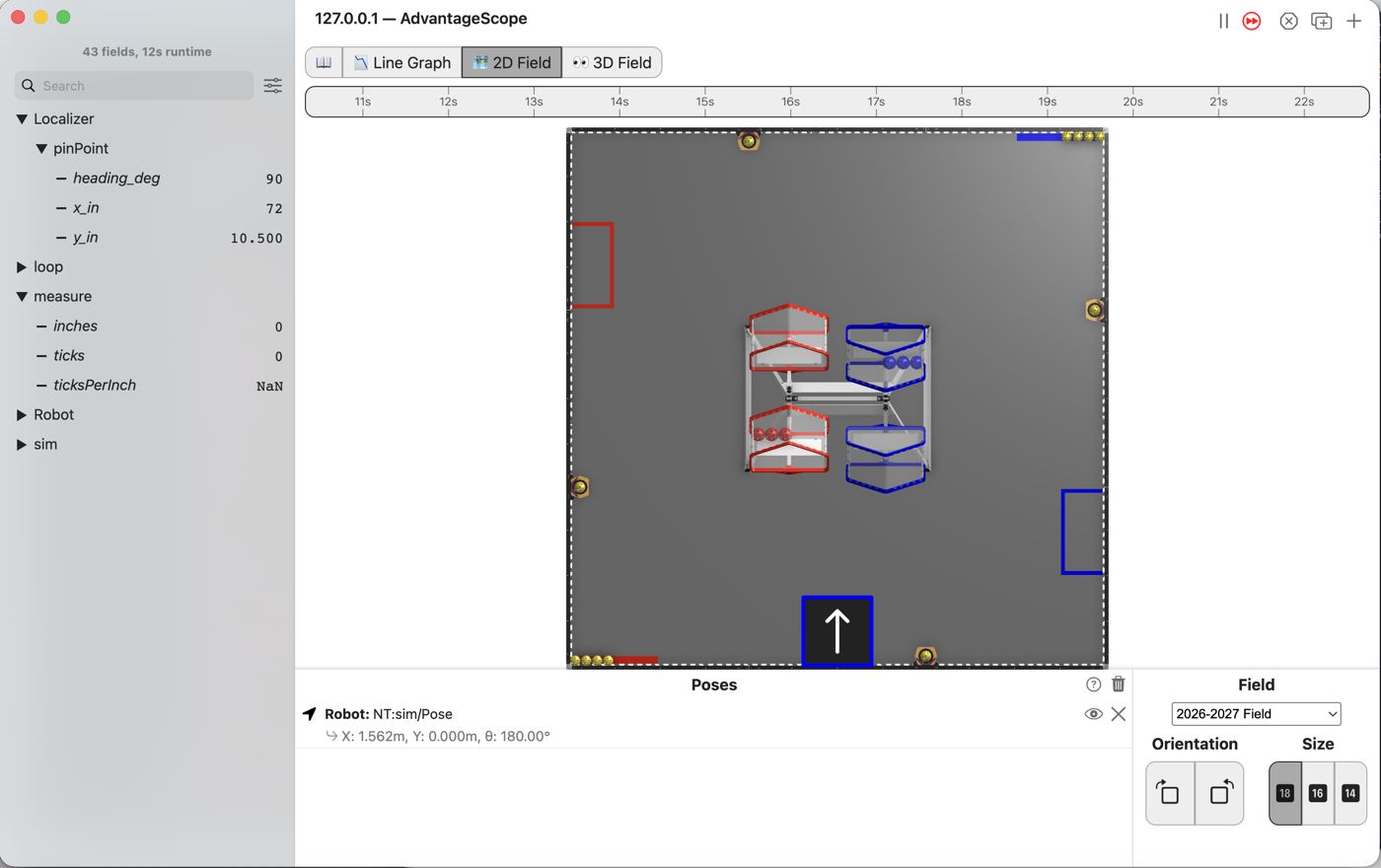
AdvantageScope. Connect to the simulator as in L020, click 2D Field, and open the measure
folder.
Check.
inchesandticksread 0.0.ticksPerInchreads NaN, which means “not a number”.
Nobody can push a robot in the simulator, so it stays at x 72 in and y 10.5 in. And 0.0 divided by 0.0 is not a number. The measuring is for the robot.
L195S040: push the robot and measure an inch
An encoder counts small steps, called ticks, as its motor turns. Many ticks make one turn of the wheel.
The robot keeps two accounts of the same trip. The Pinpoint says how far it went in inches, since its own wheels measure the floor. The drive encoders say how many ticks they counted. One divided by the other is the number.
Robot. Stop the simulator. Send the code, and run L195 Measure ticks per inch from the
Driver Station.
Push. Push the robot slowly straight forward, at least 36 in, keeping it pointing the same way. Push slowly: a wheel that slips travels without turning, and the answer comes out short.
Check.
The Driver Station shows
ticksPerInchwith a number after it.
Do it three times. Three answers a tick or two apart are a measurement.
Change. Open Constants, in the pedro folder, and put the number in ticksPerInch, which is
45.0 until you do. Send the code again and run it once more to check.
L195S050: spin the robot and measure the radius
A wheel r inches from the middle travels r inches for every radian the robot turns. So the
radius is the wheel’s inches divided by the radians. This OpMode turns ticks into inches with
ticksPerInch, so L195S040 comes first.
Robot. Run L195 Measure turn radius from the Driver Station.
Spin. Spin the robot on the spot by hand, at least two full turns, keeping it in about the same place.
Check.
The Driver Station shows a turn radius.
Measure from the middle of the robot to the middle of one wheel, once across the robot and once along it. Add those two lengths. The sum is close to the turn radius the Driver Station shows.
Change. Put the number in turnRadiusInches in Constants.java, which is 8.0 until you do.
No gamepad. None of the runs above needs one. Pushing a robot by hand is not something the simulator does, so L195S040 and L195S050 are robot steps only.
If it didn’t, and LessonsTest.l195_theTicksDoorReportsWhatEachEncoderCounted fails, the test
puts 10, 20, 30 and 40 on the four encoders, so the numbers in the message name the wheel they came
from. Each of these was planted and run.
front left, front right, back left, back right: arrays first differed at element [0]; expected:<10> but was:<0>: L195S030 is not typed yet. Every measurement would say the robot never moved.arrays first differed at element [1]; expected:<20> but was:<30>: the front right and back left went into each other’s slots. 30 is the back left’s count, in the front right’s place.
getVelocity() in place of getCurrentPosition() does not build. Android Studio underlines it
red, and the test run stops with:
error: incompatible types: possible lossy conversion from double to int
getVelocity() is how fast a wheel turns, as a decimal. getCurrentPosition() is the one that
counts.
With @Disabled left in, every test passes. The OpMode is missing from the Driver Station’s list.
If it didn’t, on the robot, and it says Encoders counted 0 ticks while the inches climb,
L195S030 is not on the robot you sent to.
If it didn’t, and the turn radius is about half what the tape says, the robot was swung around the room rather than spun on the spot. The Pinpoint counts the turning, and driving in a circle adds turning the wheels never made.
The wheels have to roll. Both OpModes make the wheels coast in start() and put braking back in
stop(). It is given code, and the other two l195_ tests watch it. They pass on the starter. Each
of these was planted in L195MeasureTicksPerInchOpMode and run.
allowConfiguredBrakeMode()added at the end ofmeasureTicksPerInch(): the coast lasts one loop, and the test saysL195MeasureTicksPerInchOpMode still coasts five loops in. The wheels would brake while the student was still pushing.allowConfiguredBrakeMode()taken out ofstop(): two messages,L195MeasureTicksPerInchOpMode brakes again afterwardsandbraking is back although no loop ran. The second is a run where STOP came before the first loop, which leaves the next OpMode coasting.
What you just did. Two constants became measurements. Constants.java came with 45.0 and 8.0
in it, and those are somebody else’s robot. Nothing in L190 could tell they were wrong, because code
cannot check a number it has no other way of knowing. Have the robot measure the same thing two
ways, with two instruments that do not talk to each other, and compare.
Where next. L195 is the last lesson. L117 tunes the numbers that need the robot driving itself rather than being pushed.