180 lesson: one OpMode a driver could take to a match
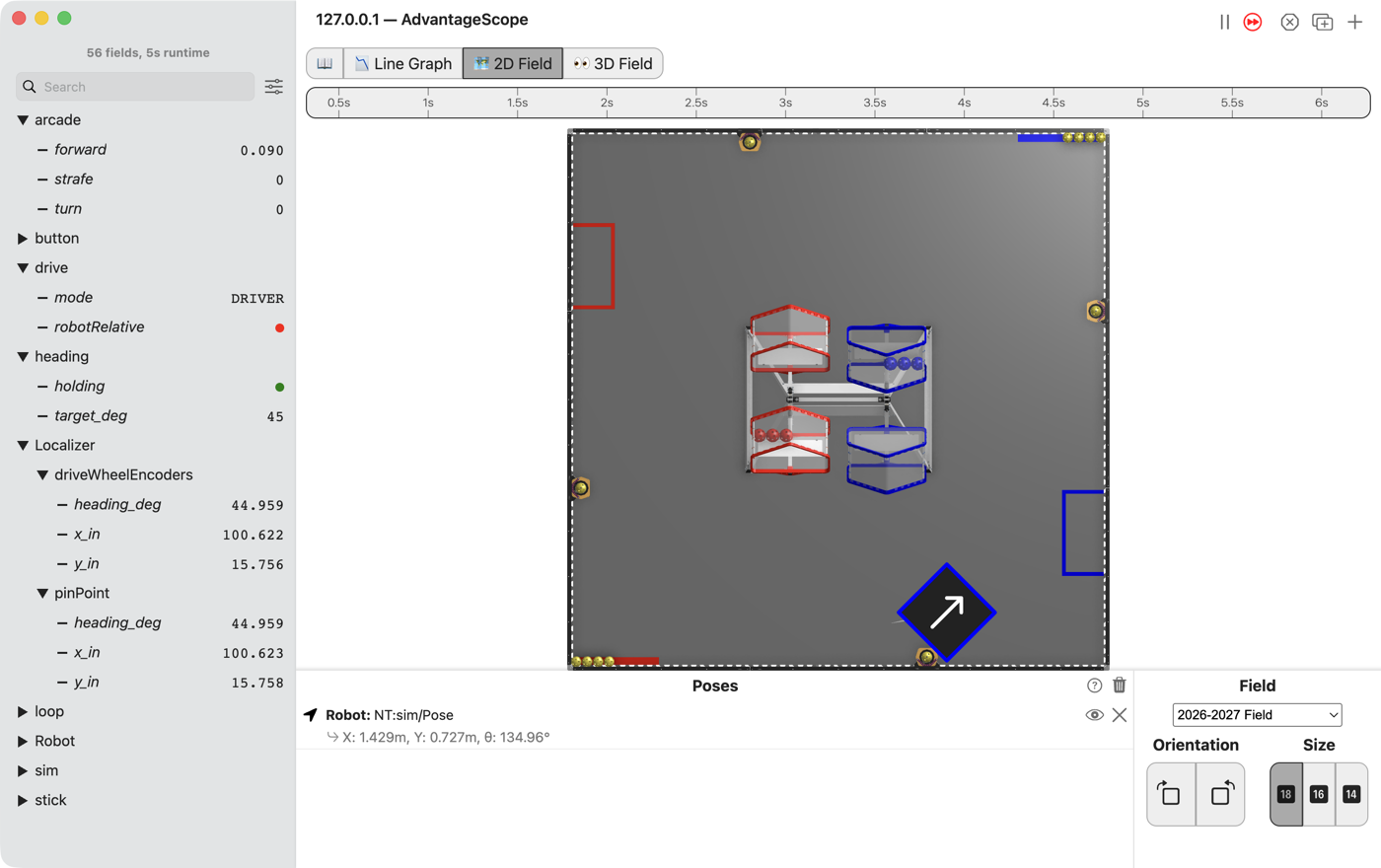
One teleop with all of it in. The sticks drive field relative and hold the heading they were left at. The right bumper means the robot’s own directions. A points the robot at 45 degrees while the driver drives. Y sends the robot to its spot until a stick moves. And your own localizer from L120 runs beside the robot’s.
the steps
L180S010: copy the starter into mytry
Copy. In lessons, click L180CombinedOpMode once and copy it. Click mytry once and paste.
In the Copy Class box, click OK. If Android Studio asks whether to add the file to Git,
click Add.
Check.
mytryholdsL180CombinedOpMode, and the new file is open.
L180S020: switch your copy on
Change. Delete the line @Disabled, under the comment that names this step.
Check.
Under the step’s comment, the next line reads
// 'public' so the robot can run this OpMode. 'public' allows access from any code.
L180S030: run your localizer again
Change. Find shadowLocalizers() and the comment that names this step. Under it, type the same
two lines as in L120:
        // When on L180S030, see
        // https://msb-stitt.github.io/ftc31459-26-27-biobuzz/guide/tasks/l180.html#l180s030
        // for what to do here.
        shadowLocalizers.add("driveWheelEncoders",
                new L120EncoderLocalizer(new HardwareWheelSource(hardware)));
HardwareWheelSource turns red. Click it and press Option+Enter, as in L120.
L120EncoderLocalizer does not turn red. It is your own, from L120, and it sits in mytry too.
Keep the name driveWheelEncoders. AdvantageScope shows each localizer under its name, so a run of
this OpMode and a run of L120 line up.
Check.
Nothing in the file is red.
L180S040: read what you are about to drive
Nothing else in the starter is new. Read loop(), driveFromTheSticks() and the methods of the
drive to the target, and find the lesson each part came from.
Both drive sticks go through
deadbandand thensquared, from L060.forwardandstrafeare turned through the heading so they mean the field, from L140.The right bumper picks the robot’s own directions, from L150.
hold.turnkeeps the heading the turn stick was left at, from L160.Y schedules the drive to
target, and any stick takes it back, from L170.
A is the one part that is new here, and it is HeadingHold again. A press of A schedules
aimAtFortyFive, a command that runs aimAtFortyFiveDegrees() once. It cancels any drive to the
target, and hold.aimAt gives the hold a heading the driver did not leave, 45 degrees. The hold
turns the robot there, and the left stick still drives. Push the turn stick and the driver has the
turn back.
When a stick takes the robot back from Y, hold.release() in giveTheDriverTheWheels() forgets the
heading the hold had before Y. Read the code without it: the hold would turn the robot back to that
old heading.
Simulator. In the Terminal, run this. It holds A and pushes the left stick a little forward:
./gradlew :TeamCode:simRun --args="mytry.L180CombinedOpMode --a=true --left_stick_y=-0.3"
AdvantageScope. Connect to the simulator as in L020, and click 2D Field. Open the heading
folder. Then open Localizer and both folders in it.
Check.
target_degreads 45.The robot turns until its arrow points up and to the right, and
pinPoint/heading_degcomes to about 45.All the while it drives to the right, and
pinPoint/x_inclimbs.driveWheelEncodersis there, and it followspinPoint: the same heading, and x and y within a tenth of an inch.
L180S050: drive all four
Robot. Stop the simulator. Send the code, and run L180 Combined from the Driver Station.
Check.
Try them in this order: field relative, the bumper held, A, and Y.
Each one does what its own lesson did, and switching between them needs nothing but a thumb.
On the robot,
driveWheelEncodersfollowspinPointas the robot drives.